Let’s be honest. Even the best writers with the strongest vocabulary and grammar knowledge can make a mistake now and then. A missing comma, capitalization, or a poor word choice — the unintentional slips could be endless! That’s why you should start proofreading ASAP, and, in this guide, we’ll teach you how to do it effectively.
What Is Proofreading
Proofreading is your last chance to catch all those sneaky little mistakes, like spelling errors, weird spacing, etc.
If you don’t proofread, those tiny issues can pile up and give your readers (and publishers, if you plan to submit your manuscript) the wrong impression. It could also undermine your credibility and attention to detail, taking away all the hard work you put into your writing —and you definitely don’t want that.
What Is the Difference Between Proofreading and Editing?
You’ve probably heard people use “proofreading” and “editing” like they mean the same thing, but they are different. And, yes, both are essential steps in polishing your writing; they serve very different purposes. Let’s take a closer look:
With editing, you’ll need to zoom out and examine the entire thing, including the flow of ideas, the structure of sentences, the clarity of the message, and whether the tone is best for your target audience.
To strengthen the article, editors may reword odd sentences, eliminate superfluous words, or even rearrange paragraphs.
Proofreading, on the other hand, comes after editing. This is your final check for surface-level errors, typos, punctuation mistakes, grammar slips, or formatting inconsistencies.
Proofreading Tips and Tricks
Before you go correcting every tiny detail, it helps to follow a simple strategy. These tips make proofreading easier, faster, and more effective.
Fix One Error at a Time
Trying to catch every mistake at once almost guarantees you’ll miss something. But focusing on one type of error per pass, like spelling, then punctuation, then grammar, keeps your brain from overloading and helps you spot more issues.
Proofread Aloud
Reading your work aloud forces you to slow down. You’ll catch awkward phrasing, clunky word placement, and repetitive wording that your eyes might skip over.
If you don’t want to read aloud, you can use online tools like NoteGPT’s text-to-speech (TTS) tool. Just a heads up, though. Some TTS tools have character limits, while others require creating an account first.
Proofread a Hard Copy
It may seem old-school, but seeing your text on paper, instead of a glowing screen, makes errors stand out more clearly. You can also mark up the page freely, which often helps you notice details you would’ve missed digitally.
Use Proofreading Marks
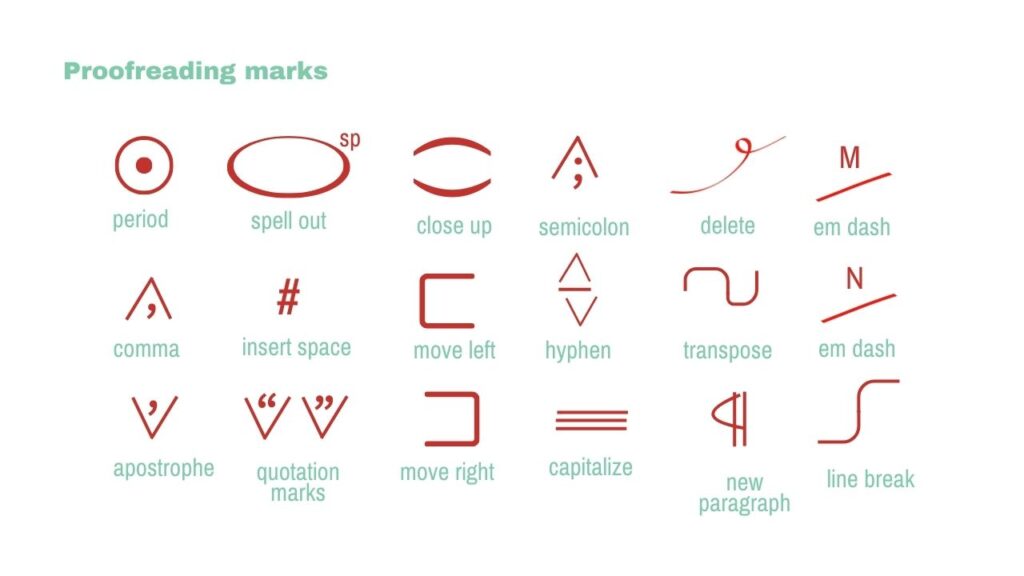
If you do decide to proofread a hard copy, don’t forget to use proofreading marks! These symbols make it easier to highlight issues and revisit them later, without having to guess or try to recall what the mistake was.
Have a List of What to Look Out for
A quick checklist of your most common mistakes keeps you organized and makes proofreading feel less overwhelming. Here is what you should look out for:
- Homonyms
- Serial commas
- Subject–verb agreement
- Inconsistent capitalization
- Punctuation errors
- Sentence fragments
- Formatting inconsistencies
- Spelling mistakes
- Run-on sentences
- Missing words
Use a Monospace Typeface
A monospace typeface gives every character the same width, so your text lines up in a neat grid. This makes spacing issues, alignment problems, and tiny errors easier to spot.
Some great monospace fonts for proofreading include:
- Courier
- Consolas
- Monaco
- Inconsolata
- JetBrains Mono
Never Edit On the First Read
Your first read should focus on understanding what the text is really about, including its tone and style. If you start proofreading too early, you might get stuck on small details and miss bigger issues. Remember, read first, fix later; it’s much more efficient.
Take a Break
Stepping away from your writing helps you return with fresh eyes. When you’re too close to a piece, your brain fills in what you meant to write instead of what’s actually on the page.
Can You Use AI to Proofread a Document?
Yes, AI can definitely help you proofread any text. It will quickly spot spelling errors, grammar issues, and awkward phrasing. Just keep in mind that it won’t be a full replacement of your own judgment. Here is a prompt to make ChatGPT an AI proofreader:
You are a proofreader. Your task is to review the text for the following:

- Homonyms
- Serial commas
- Subject–verb agreement
- Inconsistent capitalization
- Punctuation errors
- Formatting inconsistencies
- Spelling mistakes
- Sentence fragments
- Run-on sentences
- Parallelism
- Verb tenses
- Extra/missing words

This is the text that you are going to proofread: [insert text]
Final Thoughts
Proofreading might feel like just a waste of time, but remember, it, together with editing, can make your writing publish-ready. So, take your time, stay intentional, and let that final step elevate your work.