

Do you know you can write something so precise that it can guide readers through a complex system without them asking any questions? Well, that’s exactly how technical writing works. And, in this article, we will teach you the ins and outs of this content writing type so you can expand your skills.
What Is Technical Writing
At its core, technical writing is about helping someone do something correctly. You take complex information and present it in a usable, logical, accurate, and structured way. Unlike blogs or essays, the writing style of technical texts is formal and is devoid of arguments or personal opinions.
What Are the Different Types of Technical Writing
Standard operating procedures (SOPs), technical reports, API documents, and production documentation are just some of the different technical texts you’ll come across. Let’s take a closer look at each one.
Standard Operating Procedures (SOPs)
Standard Operating Procedures (SOPs), in short, outline a specific task or process and include clear instructions, defined roles and responsibilities, required materials, safety precautions, and references. Its primary goal is to ensure that tasks are performed consistently and correctly, usually by trained personnel, although some SOPs may also be designed for less experienced users.
Technical Reports
A technical report is basically a document that explains the results of a research study, experiment, or project. The way it’s organized can vary depending on the project’s size, limitations, and intended audience. But most technical reports usually include sections like an abstract, an introduction, a description of the methods used, an analysis of the data, and a conclusion or recommendations.
API Documentation
API documentation explains how to connect to and interact with an Application Programming Interface (API). It usually covers things like an overview of the API, how authentication works, the available endpoints, examples of requests and responses, and how to handle errors.
Product Documentation
Product documentation, as the name suggests, provides technical information about a product. This can include details about its limitations, how to maintain or repair it, and how to troubleshoot common issues. It often uses graphics or visual aids, such as diagrams, to explain the information more clearly.
This type of documentation can come in different forms, such as user manuals, maintenance guides, and technical specifications. Some are written for everyday users, while others are meant for technicians.
Proposals and Grant Writing
Believe it or not, proposals and grant writing are also considered part of technical writing. While they do include some persuasion, what makes them different from a typical persuasive essay is their structured, evidence-based approach.
What Are the Characteristics of Technical Writing?
Want to make your technical texts more impactful? Make sure that your content has these characteristics:
- Clear and Concise: Avoid ambiguous or confusing language, and explain each technical term as it comes up. Short sentences and direct phrasing also help readers understand the message faster.
Tip: Clear, concise writing is not just for technical text. It also applies to academic writing.
- Coherent: Use headings, lists, transitions, and even visuals to help your readers easily move through the document.
- Concrete: Vague writing won’t help anyone. So, use examples, data, visuals, and make instructions actionable.
- Correct: Accuracy is essential in technical texts. Make sure all your facts, data, terminology, grammar, and spelling are correct.
- Complete: A technical document should provide all the information the reader needs to complete a task or understand a concept. Missing steps, incomplete explanations, or unclear instructions will only lead to confusion.
Tip: Good technical writing anticipates the reader’s questions and answers them clearly.
- Courteous: Technical writing is formal and objective, which means you should always use a professional tone.
What Are the Steps of Technical Writing?
Trying technical writing for the first time? These 7 steps break down the process from start to finish.
Step 1 – Determine the Goal
Put your pen and paper down or close your laptop.
Before you start writing, clarify exactly what the technical text is for by breaking it down into two perspectives:
- Your goal – Why are you creating this document? Are you explaining a product feature, reducing support tickets, documenting a process, or promoting a technical solution?
- Reader’s goal – What do they need to accomplish? Installing software? Fixing a configuration? Understanding a technical concept?
A strong technical document aligns both. For example, if your client wants users to adopt a tool, you need to show them how it solves their problem quickly and clearly.
To define the goal effectively:
- Identify the exact problem the document should solve.
- Determine the expected outcome after the reader finishes reading.
- Write a short statement summarizing the purpose of the document.
Step 2 – Analyze the Audience
Technical documents are not for everyone; they’re for a specific group of users. But why should you even bother analyzing your readers? Well, understanding your audience helps you decide:
- How much detail to include
- Which terminology is appropriate
- How to structure your instructions
For example, if you’re writing for experienced engineers, you can use technical terminology directly. But if your readers are beginners, you need to define and explain terms and even provide examples.
Tip: The more accurately you understand your audience, the easier it is to create technical documentation that is useful and easy to follow.
When analyzing your target audience, identify the following:
- Technical expertise – beginner, intermediate, or advanced users
- Professional role – developer, engineer, technician, manager, etc.
- Context of use – troubleshooting, learning, installation, or training
- Knowledge gaps – what they likely don’t understand yet
Step 3 – Research and Gather Data
Research is often the most time-consuming stage of technical writing, and for good reason. A technical document must be accurate, complete, and reliable.
When doing your research, consider the following:
- Talk to Subject Matter Experts (SMEs): Interview engineers, developers, designers, or product specialists, and ask about workflows, limitations, and common user errors.
- Collate Technical documentation and specifications: Search for product specifications, design documents, and system architecture diagrams, as these are critical details.
- Hands-on testing: Whenever possible, perform the steps yourself. This helps you identify potential issues users might face.
- Review existing documentation: Review previous manuals, tutorials, and knowledge base articles for context.
During this stage, organize your findings into notes, diagrams, and references. The goal is to build a solid knowledge base before you start writing.
Step 4 – Sort the Information and Plan the Structure
Readers rarely read technical documents from beginning to end. Instead, they scan headings and jump directly to the information they need. So, in step 4, you should organize your notes and research into a clear, logical structure.
Start by creating an outline that includes:
- The main sections of the document
- Supporting subsections
- Step-by-step instructions or explanations
A well-planned structure usually looks like this:
- An introduction that explains the purpose
- Conceptual explanations (if needed)
- Task-based instructions
- Examples or troubleshooting sections
- A conclusion or next steps
During this stage, you should also identify whether visuals are needed or not, which sections require examples or use cases, and where definitions of technical terms should appear.
Step 5 – Write the Draft
Technical text can take many forms, and each comes with its own challenges. So, to help guide you as you draft, here are some do’s and don’ts in technical writing.
Do:
- Use clear and precise language.
- Write in active voice.
- Break complex instructions into numbered steps.
- Use examples and real scenarios.
- Add diagrams, screenshots, or tables where helpful.
- Keep paragraphs focused on one idea at a time.
Don’t:
- Use unnecessary jargon or unexplained acronyms.
- Write long sentences that hide the main action.
- Assume readers already understand technical concepts.
- Include irrelevant background information.
- Overload the document with large blocks of text.
Tip: The first draft does not need to be perfect. Your goal for this step is to translate the planned structure into clear, usable content.
Step 6 – Get Feedback
Once you have a draft, the next step is to ask your peers or experts to review it. But why should you ask for feedback? Well, there are two main reasons:
- Technical accuracy SMEs can confirm that the information is accurate, complete, and aligned with how the system actually works.
- Clarity improvement: Editors or colleagues can identify confusing sections, unclear explanations, or missing steps that the writer may overlook.
When requesting feedback, ask reviewers to focus on:
- Technical accuracy
- Missing steps
- Clarity or precision
- Correct terminology
Tip: We suggest that you don’t skip this step. Others’ eyes can catch things you might miss.
You can also ask AI to review your draft by using this prompt:
You are my editor. Your task is to review the provided technical text below.

About the text:
Topic: [insert topic]
Technical document type: [insert info]
Target audience: [insert target audience]
Technical document's goal: [insert info]


As my editor, please review the provided technical text and offer suggestions. When reviewing, consider the following
- Missing or confusing steps
- Jargon/term explanations
- Clarity or precision
- Correct or incorrect terminology use
- Logical structure

Output
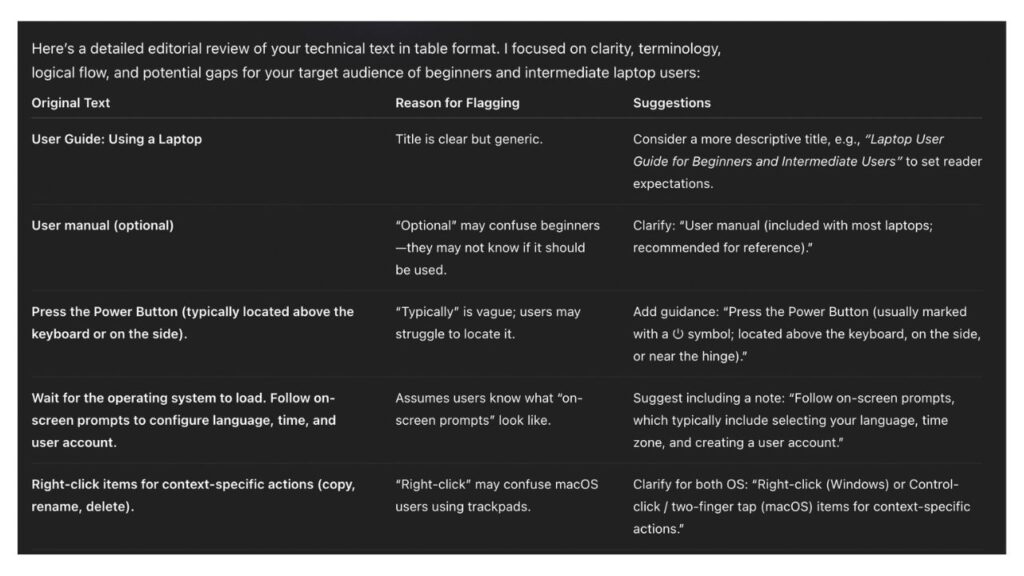
- Put your suggestions in a table, with columns for the original text, reason for flagging, and suggestions

Constraints
- Do not alter the provided text.

Technical text: [insert text]
Here’s an example of ChatGPT’s feedback (the technical text is about using a laptop)
Step 7 – Proofread and Finalize
Proofreading is your last quality check before publishing. Focus on:
- Spelling and grammar
- Sentence structure and punctuation
- Consistent formatting of headings, lists, and spacing
- Correct links and references
If you want a more detailed strategy, follow our proofreading tips and tricks.
Final Thoughts
There you have it! Technical writing is really just about producing a document that guides someone through a process. So, focus on structure, accuracy, and the reader’s needs, and your text becomes a helpful tool instead of just a document.